Grocery list · method
How to make a grocery list from your meal plan
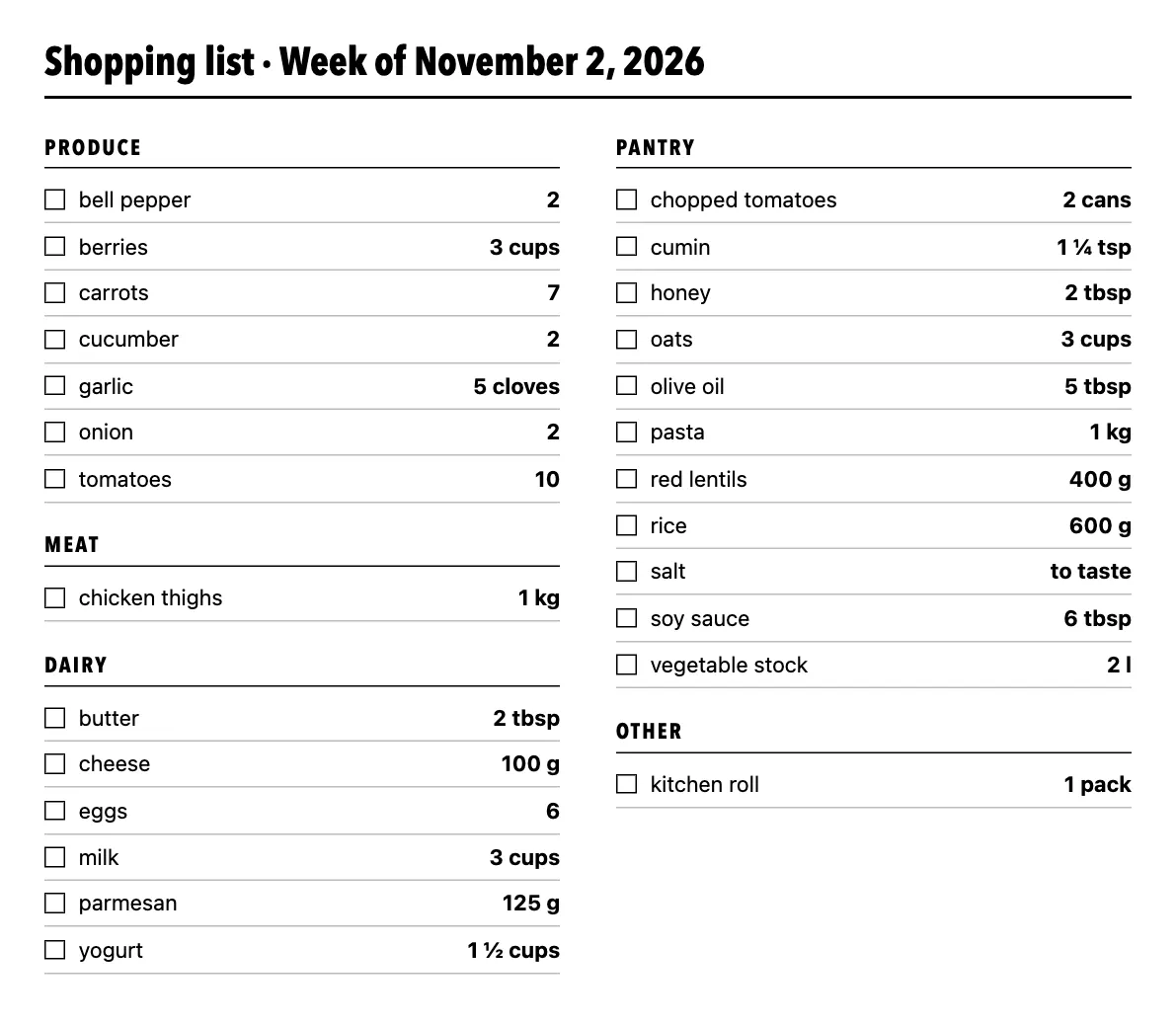
Write the list from the week's meals, not from memory. For each planned meal, take the recipe's ingredients at the number of servings you will actually cook, add identical items together, round things you buy whole up to the next whole one, then sort by aisle and cross off what is already at home. In our family example, 63 recipe ingredient lines plus 1 extra item become 26 shopping entries.
A running list on the fridge catches the milk you ran out of, but it can't tell you how many carrots three different dinners need. That number comes from the meals themselves. Below is the method with the figures from one planned week.
Step 1: Decide the meals first, and how many people each one feeds
A grocery list can only be as specific as the plan behind it. Our family example week has 12 meals from 5 recipes, and each meal has its own servings: Monday's tomato pasta is for 4, Thursday's is for 6. Writing the servings down at this stage is what makes the amounts on the list right later.
You don't need all 21 slots. 9 meals in that week are left empty, and nothing for them goes on the list. The three sample weeks all leave 9 slots open.
Step 2: Scale every recipe to the servings you will cook
Recipes are written for a fixed number of people. When the meal is for a different number, every measured ingredient changes by the same factor: servings planned ÷ servings in the recipe. The tomato pasta recipe serves 4 and uses 400 g pasta; for 6 people that is 400 × 6 ÷ 4 = 600 g. Ingredients without an amount, such as "salt to taste", stay on the list with no number.
Step 3: Add matching items together across the week
This is the step that shrinks the list. If you copied each planned meal's ingredients one by one you would write 64 lines for the family week (63 from recipes plus 1 extra item, kitchen roll). Adding identical items together leaves 26. The other two example weeks shrink the same way:
Almost all of the saving comes from recipes planned more than once: overnight oats on three mornings is one line for oats, not three. Of the 38 lines saved in the family week, 37 come from repeated recipes and 1 from two different recipes sharing an item (carrots, used by Red lentil soup and Chicken rice bowl).
Units have to agree before you add. Grams and kilograms combine; so do teaspoons, tablespoons and cups. Metric and US units are kept apart (grams don't merge with ounces, millilitres don't merge with cups), and cloves of garlic don't merge with grams of garlic, because a clove has no fixed weight. Names matter just as much: in the vegetarian week "rice" for the curry and "risotto rice" stay separate, which is right, because they are different packets on the shelf.
Step 4: Round whole items up, but keep the exact need
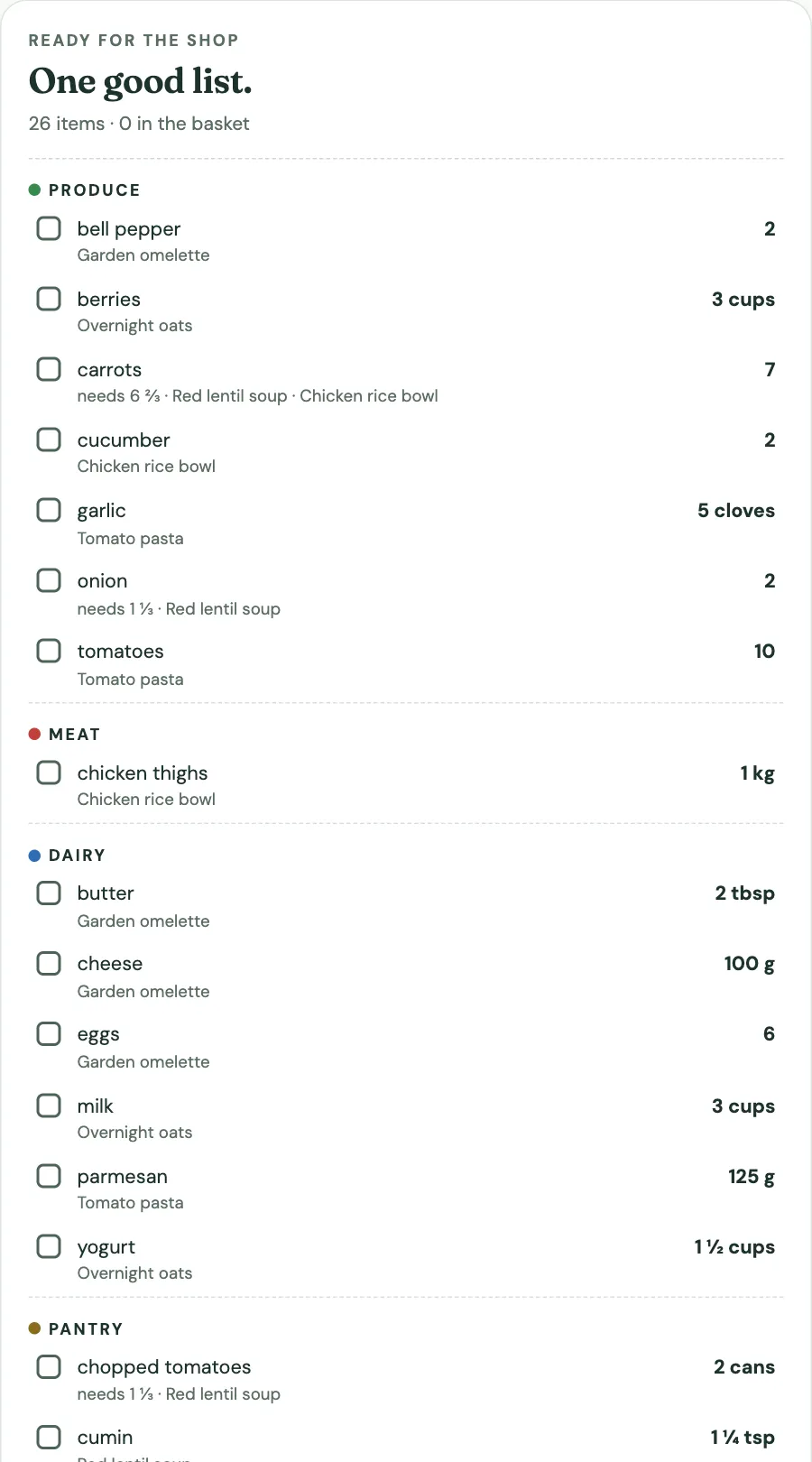
You can't buy two thirds of a carrot. Things sold whole get rounded up, and the exact amount stays next to them so you know how much is spare:
| Item | Recipes need | Buy | Used by |
|---|---|---|---|
| carrots | 6 ⅔ | 7 | Red lentil soup, Chicken rice bowl |
| onion | 1 ⅓ | 2 | Red lentil soup |
| chopped tomatoes | 1 ⅓ cans | 2 cans | Red lentil soup |
The carrots come from two recipes: the lentil soup uses 2 carrots per 6 servings and is planned for 8 servings (2 × 8 ÷ 6 = 2⅔), the rice bowl uses 2 per 4 servings and is planned for 8 (2 × 8 ÷ 4 = 4). Together that is 6⅔, so the list says 7. In the cook-once week none of the 22 lines needs rounding: every item bought by count happens to scale to a whole number there (the soup is planned at 1.5 times its recipe, which turns 2 carrots into 3).
Step 5: Sort by aisle, then cross off what you have
A list in recipe order sends you back and forth across the store. Grouped by aisle, the family week's 26 lines become 5 short sections: Produce 7, Meat 1, Dairy 6, Pantry 11, Other 1. How those groups are chosen, and the few items that land in the wrong one, is its own topic: see grocery list categories.
Last, check the cupboard before you leave. Salt, oil and cumin are on the list because the recipes use them, not because you are out. Tick them off at home, then use Hide bought items to focus the screen on what you still need. Copy, text download and print retain the full list with bought items marked; hiding a row does not remove it from those exports.
No meal plan? Start from the recipes
If you have already picked three or four recipes and only need the shopping list, skip the week grid. The grocery list generator runs steps 2 to 5 on pasted recipes: set how many servings each recipe makes and how many you are cooking for, and it scales, adds, rounds and sorts in one go. Its own example turns 17 ingredient lines from three recipes into 12 items.
What a list made this way does not do
It does not look up store prices, available package sizes or what is in your fridge. You can enter a package size yourself, such as 2 (400 g) cans tomatoes; it is kept as part of that shopping item, not used to infer the store's packaging. A week that needs 125 g of parmesan will say 125 g, even if the shop only sells 200 g wedges; that judgement is yours. If you are working to a budget, start from what the USDA food plans say a week of groceries costs and check the list against it.
Questions
What is the fastest way to make a grocery list?
Plan the meals first, then let the list come from the recipes. In Mintquiet you pick a recipe for each meal and set the servings; the list is added up, rounded and sorted by aisle as you go.
Should a grocery list be sorted by aisle or by recipe?
By aisle for shopping, with the recipe noted on each line. Sorting by recipe repeats items (in the family week, carrots appear under two dishes) and sends you around the store more than once.
How do I avoid buying things I already have?
Read the finished list at home and tick off what is in the cupboard before you go. Staples such as oil, salt and spices are on the list because the recipes use them, not because you have run out.
Why does the list say 7 carrots when the recipes add up to 6⅔?
Carrots are bought whole, so the amount is rounded up to the next whole one. The exact need is shown beside it so you know there will be a little left.
Sources
- Mintquiet example weeks, run through the planner's own list code — line counts, rounding and aisle totals on this page